Logging settings
The SDK logs user actions, network requests, and errors to a file and to OSLog. Files are stored in Documents/Logs/ and rotated by size. In case of SDK issues, attach the files to a request to support.
The logging level and parameters are set during SDK initialization via ChatLoggerConfig.
Logging is disabled by default; it is recommended to enable it only in test builds.
Basic setup
Set the logging level when creating ChatLoggerConfig:
let loggerConfig = ChatLoggerConfig(logLevel: .all) // Log all messages

// Or:
// let loggerConfig = ChatLoggerConfig(logLevel: .error) // Log only errors

let chatCenterSDK = ChatCenterUISDK(providerUid: "YOUR_PROVIDER_UID",
                                    chatConfig: chatConfig,
                                    loggerConfig: loggerConfig)
Available logging levels (ChatLogLevel):
ChatLogLevel conforms to OptionSet — levels can be combined: [.info, .error].
.off: Disables all SDK logging..info: General information about SDK operation (operations, state changes)..rest: REST network request data..webSocket: Messages from the WebSocket..userInterface: UI events, user actions..error: Errors that may lead to crashes or incorrect behavior..network: Composite level — combines.restand.webSocket..all: Combines.info,.rest,.webSocket,.userInterface,.error.
Level recommendations:
- Debug and test builds —
.all. Full data volume for diagnostics. - Release builds —
.off. Logs are not written; sensitive data does not end up in the file or OSLog. - Logs are written through OSLog (subsystem
io.edna.chatcenter.ui.logs) and to a file. In Console.app and Xcode, filter by subsystem.
Additional settings
The size and number of log files are set in ChatLoggerConfig.
init(logLevel: ChatLogLevel = .off, logFileSize: Int = 2, logFilesCount: Int = 10)
ChatLoggerConfig initializer parameters:
| Field | Type | Required | Description |
|---|---|---|---|
logLevel | ChatLogLevel | No (default .off) | Logging level. .off — logging is disabled |
logFileSize | Int (MB) | No (default 2) | Maximum size of a single log file |
logFilesCount | Int | No (default 10) | Maximum number of stored log files. When logFileSize is reached, writes move to a new file, and the oldest files (by modification date) are deleted |
None of the three fields are part of the public interface — they are set on object creation and are not available for reading or modification from outside.
Usage example:
// Enable logging with the .info level
let loggerConfig = ChatLoggerConfig(logLevel: .info, logFileSize: 5, logFilesCount: 5)
let chatConfig = ChatConfig(transportConfig: chatTransportConfig, networkConfig: ChatNetworkConfig())
let chatCenterSDK = ChatCenterUISDK(providerUid: "YOUR_PROVIDER_UID", chatConfig: chatConfig, loggerConfig: loggerConfig)
Sending logs
The SDK shows the log file through the system share sheet — by shaking the device or programmatically.
Shake gesture
On the chat screen, shake the device — a system share sheet appears with a zip archive of the logs:
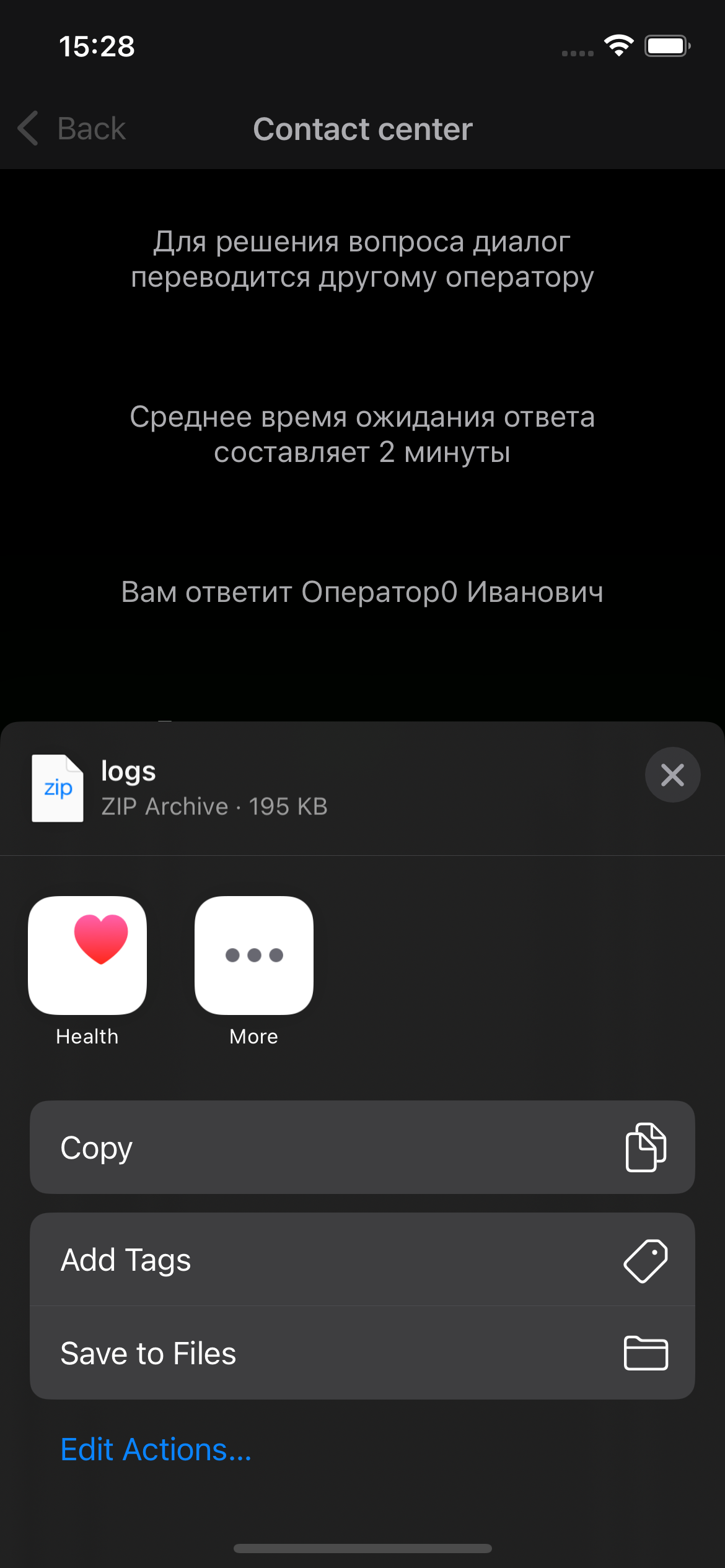
The shake gesture is handled only on the chat screen. If logging is disabled (logLevel: .off), the share sheet is not shown.
Programmatic share sheet call
To call it from application code (for example, in e2e tests), use the EDNALogger.shareLogs(in:) method:
func shareLogs(in viewController: UIViewController)
| Field | Type | Required | Description |
|---|---|---|---|
viewController | UIViewController | Yes | The controller on top of which UIActivityViewController with the zip archive of logs is shown. The controller's view must be loaded and attached to a window (viewIfLoaded?.window != nil). |
Example:
@objc func sendLogsTapped() {
    // ⚠ MigrationServiceLocator is a transitional API (see the warning below).
    // Isolate this call to a single debug function so that the replacement
    // can be a point change when moving to the stable API.
    MigrationServiceLocator.logger?.shareLogs(in: self)
}
MigrationServiceLocator — transitional APIIn the current version, the only public access to the active logger is via MigrationServiceLocator.logger. The API is unstable and may be made internal in one of the next major SDK releases — code using it directly will stop compiling.
Recommendations:
- Do not call
MigrationServiceLocatorfrom a production flow. A valid scenario is a debug "Send logs to support" button, isolated behind#if DEBUGor your own feature flag. - If you need to intercept logs (rather than show a share sheet), use the delegate method
ChatCenterUISDKDelegate.didLog— that is a stable API. - Watch the Changelog — the example above will be updated when a stable replacement is available.
shareLogs(in:) does nothingThe share sheet is not shown if:
loggerConfigwas not passed to the SDK constructor — there is no active logger,MigrationServiceLocator.loggerisnil;logLevel: .off— the logger is created, but the method returns without doing anything;- the controller's view is not loaded or not in a window (
viewIfLoaded?.window == nil).
Related
- SDK initialization settings — passing
loggerConfigat initialization - SDK delegate — the
didLogmethod for intercepting logs into your own system (not called whenlogLevel: .off) - Report a bug — how to send logs to support
- Troubleshooting — diagnostics with the help of logs